 by
by Official Website: http://www.smashhitplunder.com/
Developers: Triangular Pixels
Role: Gameplay Programmer (5 months)
Shipped: Yes
Platform: PS4 (Playstation VR)
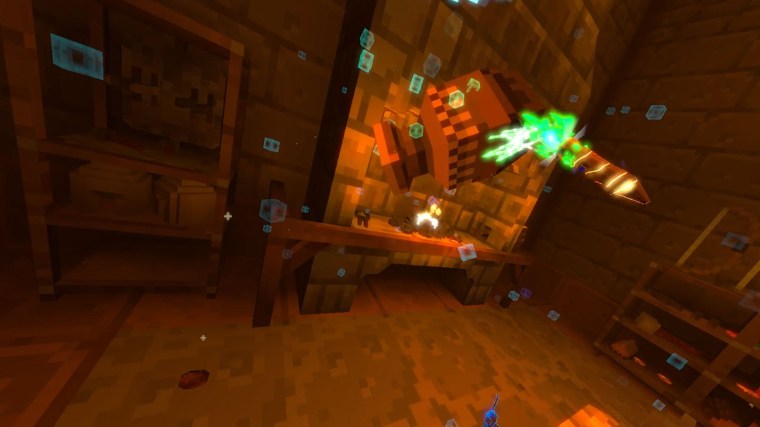
Smash Hit Plunder is a PSVR tear-it-up set in a medieval castle and it’s sprawling surroundings. You play as a mage – you think you’ve just inherited the castle of your dreams from your family, but actually it’s been magically locked up by a ghostly debt collector. Now it’s down to you to find enough hidden treasure in the castle to pay off the debt…
Official synopsis
I had the honour of working with Triangular Pixels on their debut PSVR title Smash Hit Plunder as Gameplay Programmer for 5 months. As a development team, their core values always allow for the player to have as much agency as possible, and most importantly have as much fun as possible.
During that time, I worked with them to bring some really fun gameplay mechanics to life, including:
- Fire propagation system.
- In some levels, the player can find fire sources such as fireplaces, forges, and candles. I worked on making those environmental pieces much more interactive, by creating functionality that allowed designers to designate fire zones/components, which objects were flammable, and how fast fire spread (transference time, burn time before destruction, etc.).
In the end product, this allows players to pickup objects that are flammable (such as a book, candle, or bomb) and light them in any appropriate fire. This can lead to hilarious mayhem where they set half their castle props on fire, or even light bombs to help them against some less than friendly inhabitants… - Related mechanics and effects include:
- Loot spawning.
- Particle spawning/management.
- Audio spawning/management.
- Whilst working with the Triangular Pixels team to create this feature, it was important to design the system to be flexible enough to be applied to any and all relevant objects. It was also important to keep the performance in check – as you can imagine, allowing the player to set fire to anything flammable could have some potential for performance pitfalls.
- In some levels, the player can find fire sources such as fireplaces, forges, and candles. I worked on making those environmental pieces much more interactive, by creating functionality that allowed designers to designate fire zones/components, which objects were flammable, and how fast fire spread (transference time, burn time before destruction, etc.).
- Game Modes.
- Whilst some of the core game modes had been created, some of the multiplayer game modes were in need of creation or alteration. I worked with the team to develop some of the game’s unique multiplayer modes.
- UI Programming and creation.
- During the course of my time with the team, the game required new UI pieces for emerging new game modes, and some alterations to older UI. Using the assets created by the team’s artists, I created various pieces of UI based on some existing design patterns, and hooked these all up to the relevant gameplay variables and functions.
- Simple environmental AI (Pigeons, Mice, Spiders).
- The game features a variety of environmental AI. I worked on behaviour and animation systems for these AI including
- Pigeons that roosted at various points around the level (able to be designated by the designers), and got spooked and fluttered away when the player was near or threw objects near to them. Their pathfinding relied on a 3D volumetric solution (as opposed to a typical navmesh).
- Mice that scurried away when the player got near or threw object near (similar to pigeons), using a navmesh to work out a new “safe” location.
- Spiders that could scuttle along walls and ceilings cool as a cucumber.
- These creatures all reacted to the player throwing objects directly at them (disappearing and spawning loot).
- All variables were fully customisable by the designers on the team.
- The game features a variety of environmental AI. I worked on behaviour and animation systems for these AI including
- “Eating” mechanic.
- Some gameplay objects can be “eaten” by the VR player in order to break them down and gain loot from them. This includes objects such bread and ham, and would breakdown when the player brings the object towards their mouth. I developed this system to allow for designers to determine the different states of the prop, the amount of loot it would spawn, and the mechanic of it being “eaten” by the player.
- Tilt loot props.
- Some props in the environment can be tilted to gain maximum loot. For instance, the player might see a vase and decide to smash it. However, more experienced players will realise that the maximum loot opportunities that arise from such a prop would require them to tilt the object upside-down in order for loot to come pouring out the innards. I worked with the team to create this system working with existing loot spawn systems, and existing props. This could then be customised by the designers (threshold angle, loot count etc.).
- Tap loot.
- Some levels feature taps (such as on kegs) that the player can use their wand on to rotate the tap, dispensing loot (and liquid). Using the physics system of the engine, I worked with the team to create a responsive interaction allowing the player to do just that. It was certainly one of the more challenging mechanics (for instance, relating the player’s motion controller motions to the tap – something that took several iterations for the right feel and responsiveness).
- Hub room desk reset system.
- In the hub room, there were several important items on the main desk. This includes a scroll with cranks that acted as a level select screen, a level start orb, a quill, and pins to stab into the scroll (each pin represented a different game mode).
It was important that these props did not get lost around the room, or even worse somehow fall out the map and halt the player’s progress. To combat this, we designed (and I implemented) a system that simply teleported the props back into their appropriate spot if they were either too far away, or had been at a medium distance for a certain amount of time.
- In the hub room, there were several important items on the main desk. This includes a scroll with cranks that acted as a level select screen, a level start orb, a quill, and pins to stab into the scroll (each pin represented a different game mode).
- Level Select scroll cranks
- In the hub room, there is a large scroll that acts as the players level select. It allows them to crank the scroll to the left and right (revealing more of the map/levels available), and allowing them to stab a game mode pin into the scroll to setup the next level and mode.
I had the challenge of creating a responsive crank system that allowed the player to crank the handles around and have this applied to the scroll visuals and respective levels that appeared on it.
- In the hub room, there is a large scroll that acts as the players level select. It allows them to crank the scroll to the left and right (revealing more of the map/levels available), and allowing them to stab a game mode pin into the scroll to setup the next level and mode.
 Samuel Pike